Engineering
Annotating AI-Generated Diagrams with the /diagram Skill
Obin Engineering
•

Our engineers communicate and collaborate using system diagrams. We’re talking about everything from permission models to auth flows to service maps. So do domain experts and engineers. Here, we are talking about Standard Operating Procedures (SOPs), provenance trees, and data transformation flows. But they kept running into the same challenge — when a diagram was wrong, telling an agent what to fix took longer than fixing it manually.
“Move that box under the other one.” Which box, and which other one?
“Connect them with a dashed line, not solid, and put it on the left, not crossing the flow.”
By the time the directions were finished, more time had gone into writing than the change was worth. Models are good at a lot of things, but reading someone’s mental picture of where a box should sit isn’t one of them, no matter how carefully it’s described.
So at Obin, we built a better way. A /diagram skill.
What it does
/diagram renders the diagram as a live webpage. On top of that sits an annotation layer where you can draw on it with a pen tool, circle the part that’s wrong, and write what you want in a few words instead of a paragraph. If the user hits a button, “update with annotations,” the UI renders the sketch and passes along the note to the coding-agent session running the diagram. The agent reads the annotation against the current source, edits it, and the page reloads with the fix already in place.
On a real diagram, the sequence of actions may look like this: the user circled a table of roles and permissions and wrote a note saying they wanted them extracted against the actual list of services. Then, because “extracted against the list of services” isn’t obviously one specific layout, they drew what they meant. Four rough vertical lanes, a roof line connecting them, the kind of sketch you’d draw on a napkin.
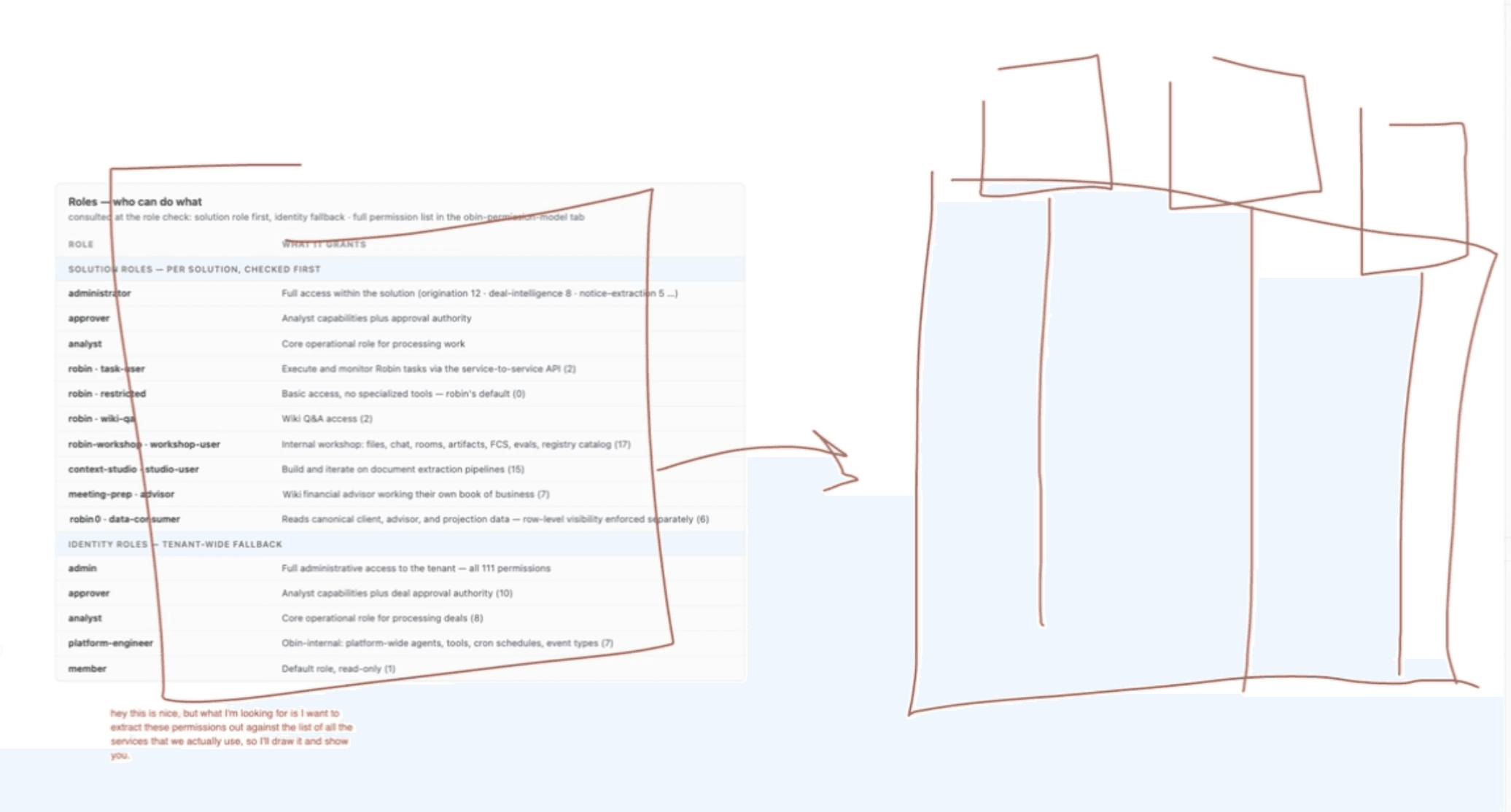
Hit “update”. A few seconds later, the diagram had rebuilt itself into an actual lane chart, permissions grouped under the services that enforce them, matching the shape the user had scribbled almost exactly.
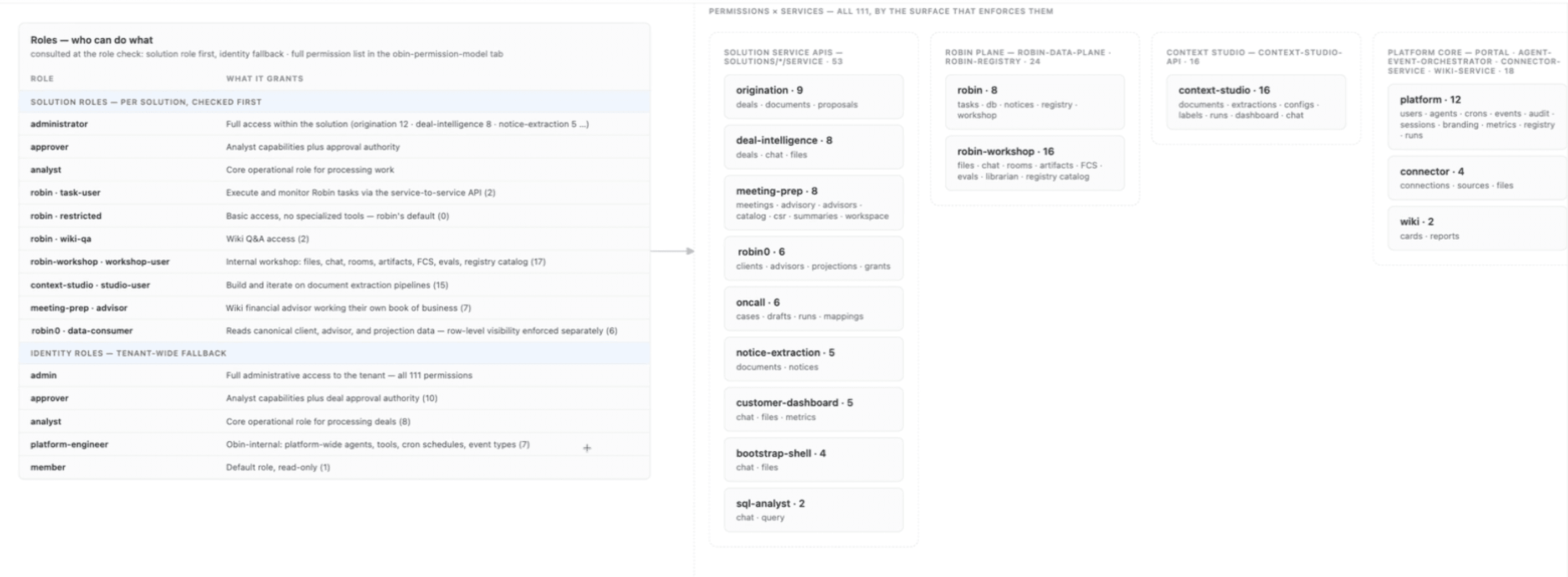
The user didn’t have to write a whole paragraph about column widths or grouping logic. They just had to draw four boxes and say, “like this.”
And potentially the best part is that the annotation protocol isn’t a one-off convention someone has to re-explain every time a new session opens. The whole process is documented well enough, in the skill itself, that a session that’s never been briefed can pick it up cold and start participating correctly.
The skill also gets better on its own. When it detects an interaction pattern, it gets promoted into the skill’s own definition, so the next diagram inherits corrections made on a completely different one.
Diagrams are visual and spatial, and describing visual and spatial changes in text is a bad interface no matter how good the model on the other end is. Think about anywhere you’d normally write a paragraph explaining a visual or spatial change to an agent. For example, a document extraction that pulled the wrong field because two boxes overlap on the page, or a UI an agent built where one panel needs to move above another. Any case where the fix is obvious the moment you can see it, but hard and painful to put into words.
Now, correcting an agent can be a gesture, the same one you’d use correcting a person standing next to you.
What’s next
We’re pulling /diagram out into a public repo here so other teams can use the same pattern, whether or not diagrams are the thing they’re correcting.
This is worth using if you build something with any kind of visual or spatial shape and you’re tired of writing paragraphs to fix it.

AI Strategy
Sep 21, 2026
Why Standard Application Controls Fail for AI Agents in Finance and How to Harden Them Using Architecture
AI agents break many assumptions behind traditional application security because they generate their own plans, operate on untrusted inputs, and can change behavior from one run to the next. The article argues that the answer is architectural: enforce identity, permissions, tool access, isolation, and approval in deterministic code outside the model, with controls applied to every individual tool call. Obin applies this approach to its Robins so the model can propose actions, but the runtime decides what is actually allowed.

Design
Sep 17, 2026
Building an AI-Native Design System for Forward-Deployed Teams
Obin is building an AI-native design system that gives forward-deployed teams the flexibility to adapt workflows for individual customers without rebuilding the product each time. By combining shared tokens, reusable components, solution-level patterns, automated guardrails, and a path for proven customer work to flow back into the system, teams can prototype faster while keeping what they build maintainable and production-ready.